Here's a problem I've hit twice in the past year: a client's website is live, looks great, but the source code is either lost (developer left, repo deleted, hosting company went under) or locked in a legacy stack (WordPress, Webflow, old PHP CMS) that's expensive to maintain and impossible to extend. The site works, users love it, but I can't ship new features without rebuilding from scratch. I need the code, but all I have is the live URL.
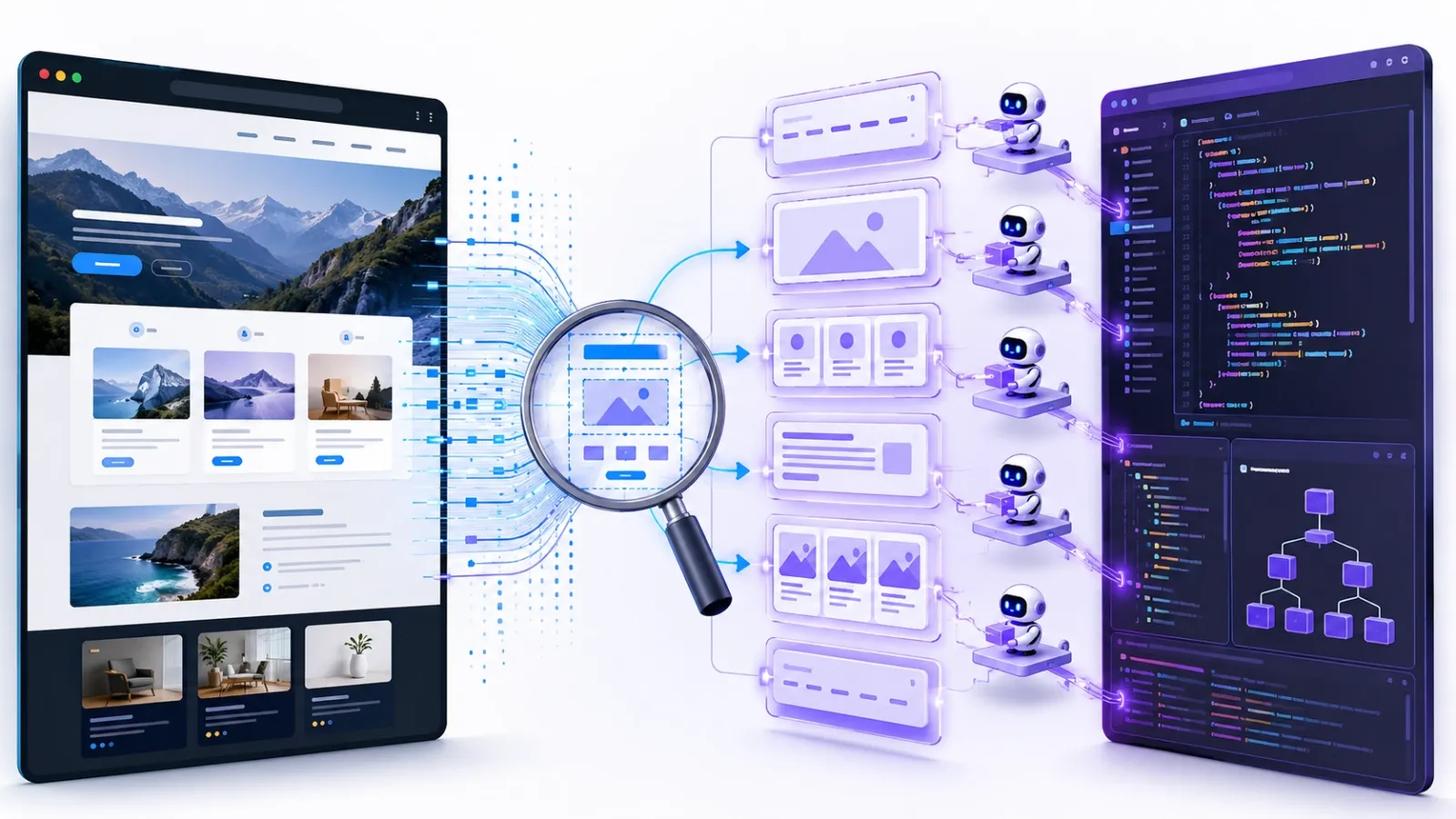
AI Website Cloner Template is a Next.js template that uses AI coding agents to reverse-engineer websites automatically. You point it at a URL, run /clone-website, and the AI inspects the site, extracts design tokens and assets, writes detailed component specifications, and dispatches parallel builders to reconstruct every section in modern React/TypeScript. The result is a clean Next.js codebase with shadcn/ui components, Tailwind CSS v4, and all the original design fidelity — no manual reverse-engineering, no pixel-pushing in DevTools.
I haven't tested it yet, but the use case is too compelling: turning "we have a live site but no code" into "we have a modern, maintainable codebase" in hours instead of weeks. That's the kind of automation that changes project economics.
What AI Website Cloner Actually Does
AI Website Cloner is a GitHub template repository pre-configured with a multi-phase pipeline for website reconstruction. It's designed to work with AI coding agents (Claude Code, Codex CLI, Cursor, Continue, etc.) — you don't run the cloning yourself, you tell an AI agent to do it.
The workflow is:
- Create a new repository from the template using GitHub's "Use this template" button.
- Open the repository in your AI coding agent (Claude Code recommended).
- Run the
/clone-website <target-url>command. - The AI agent executes a multi-phase pipeline automatically.
- Review the generated Next.js codebase, customize as needed, deploy.
The pipeline runs five phases:
1. Reconnaissance
The AI takes screenshots, extracts design tokens (colors, fonts, spacing), and performs an interaction sweep — scrolling, clicking, hovering, and testing responsive breakpoints to capture all states and variations. It documents everything in docs/research/.
2. Foundation
Updates the Next.js project globals: fonts, color tokens (converted to oklch), spacing scales, downloaded assets (images, videos, favicons). The foundation matches the target site's visual system.
3. Component Specs
For every section and component on the target site, the AI writes a detailed specification file with:
- Exact
getComputedStyle()values for every element (font size, weight, line height, colors, spacing, borders). - Interaction models (hover states, click behaviors, animations).
- Multi-state content (default, hover, active, mobile, tablet, desktop).
- Responsive breakpoints and how layouts adapt.
- Asset paths for images, icons, videos.
These specs live in docs/research/components/ and are the "source of truth" for the build phase. No guessing, no approximation — the AI has the exact computed CSS values from the live site.
4. Parallel Build
The AI dispatches builder agents in git worktrees — one per section or component. Each builder receives the full spec inline and builds the component in isolation. Because they work in parallel worktrees, multiple components build simultaneously without conflicts.
The builders use shadcn/ui primitives, Tailwind CSS v4, and TypeScript. The output is modern, type-safe React components that match the target site's design.
5. Assembly & QA
The AI merges all worktrees back into the main branch, wires up the page structure, and runs a visual diff against the original screenshots. If something doesn't match, it iterates and fixes. The final output is a working Next.js site that should look nearly identical to the target.
Why This Solves a Real Problem
I've been in this situation twice:
Case 1: Lost Source Code
A client's marketing site was built by a contractor in 2020. Beautiful design, good SEO, converting well. The contractor's company shut down in 2023. No handoff, no repo access, no documentation. The site is hosted on Netlify, but all we have is the compiled output. Client wants to add a blog and update content monthly. Current options: hire someone to reverse-engineer the site manually (quoted at $15k and 4 weeks), or rebuild from scratch (quoted at $20k and 6 weeks). Both are expensive and risky.
AI Website Cloner would let me point an AI agent at the live URL, run the cloning pipeline, and have a working Next.js codebase in a day or two. Total cost: my time to review and deploy, plus API credits for the AI agent. That's 10x cheaper and 10x faster than manual options.
Case 2: Platform Migration
A client's site is built in WordPress with a custom theme. It works, but hosting costs $200/month, and every content update requires a developer because the theme is tightly coupled to PHP templates. Client wants to move to a static Next.js site hosted on Vercel for $20/month, with a headless CMS for content editing.
The WordPress site has 15 pages, dozens of custom components, and years of design refinement. Rebuilding it from scratch would take weeks and risk losing design details. AI Website Cloner would let me extract the exact design, rebuild it in Next.js automatically, wire up the headless CMS, and deploy. The client gets the same design, lower costs, and easier content management.
These aren't edge cases — they're common problems that currently require expensive manual work. Automating the reverse-engineering step changes the economics completely.
The Tech Stack
The generated codebase uses modern, maintainable tools:
- Next.js 16 with App Router, React 19, TypeScript strict mode.
- shadcn/ui for UI primitives (Radix components + Tailwind CSS).
- Tailwind CSS v4 with oklch design tokens (better color fidelity than hex/rgb).
- Lucide React for icons (replaced by extracted SVGs from the target site during cloning).
This stack is what I'd choose for a greenfield project anyway. The cloner doesn't lock me into a custom framework or proprietary tooling — it generates clean, standard Next.js code I can maintain like any other project.
Supported AI Agents
The template works with a variety of AI coding agents. Claude Code (Opus 4.8) is recommended, but the README lists support for:
- Claude Code — recommended, Opus 4.8
- Codex CLI (OpenAI)
- OpenCode
- GitHub Copilot
- Cursor
- Windsurf
- Gemini CLI
- Cline
- Roo Code
- Continue
- Amazon Q
- Augment Code
- Aider
The repository includes agent-specific instruction files (AGENTS.md, CLAUDE.md, GEMINI.md, etc.) that tell each agent how to run the cloning pipeline. There are sync scripts (sync-agent-rules.sh, sync-skills.mjs) to regenerate platform-specific files from a single source of truth.
This multi-agent support is smart — it means I'm not locked into one AI platform. If Claude Code works best today but Codex improves tomorrow, I can switch without rewriting the pipeline.
Ethical and Legal Considerations
The README includes a clear "Not Intended For" section:
- Phishing or impersonation — don't use this to create fake versions of sites for fraud.
- Passing off someone's design as your own — logos, brand assets, and original copy belong to their owners. Don't clone a competitor's site and claim it's yours.
- Violating terms of service — some sites explicitly prohibit scraping or reproduction. Check before cloning.
I appreciate that the maintainer is explicit about this. The tool is powerful, and power requires responsibility. The legitimate use cases (rebuilding your own site, migrating platforms, learning from open-source examples) are clear and valuable. The illegitimate use cases (phishing, design theft, ToS violations) are explicitly called out as off-limits.
That said, I need to verify I have the right to clone a site before I do it. If I'm cloning a client's site they own, that's fine. If I'm cloning a competitor's site to "learn from it," that's legally and ethically murky. The tool enables the action, but I'm responsible for ensuring it's legitimate.
Potential Rough Edges (From the README)
I haven't tested this yet, so I'm inferring potential issues from the documentation and my experience with AI coding agents:
- Accuracy of extraction: The AI takes screenshots and extracts
getComputedStyle()values, but complex interactions (JavaScript-driven animations, third-party embeds, dynamic content) might not capture correctly. The result will be "close" but probably not pixel-perfect without manual refinement. - Dynamic content: If the target site pulls content from an API or CMS, the cloned version will have static snapshots of that content, not the dynamic source. I'd need to wire up a CMS separately.
- Complex state management: Sites with heavy client-side state (e-commerce carts, multi-step forms, real-time collaboration) won't clone their logic automatically. The AI can rebuild the UI, but business logic and state management are separate problems.
- Performance and accessibility: The cloned code will match the visual design, but it won't necessarily preserve performance optimizations or accessibility features unless those are visible in the DOM. I'd need to audit and improve those separately.
- Cost: Running an AI agent through a multi-phase pipeline with parallel builders will burn API credits. For a large site (dozens of pages, hundreds of components), that could be expensive. I'll need to monitor costs and potentially limit scope to high-priority pages first.
- Time: The README says "hours instead of weeks," but I don't have benchmarks. A simple landing page might take an hour. A complex site with 50+ pages might take a day or more of agent runtime, plus my time to review and refine.
Use Cases I'm Planning to Test
Here's how I'd validate whether AI Website Cloner is worth adopting:
Test 1: Simple Landing Page
Clone a single-page marketing site (my own or a client's with permission). Measure: time to complete, accuracy of design reproduction, quality of generated code, manual cleanup required.
Test 2: Multi-Page Site with Shared Components
Clone a 5-10 page site with a consistent design system (header, footer, button styles, typography). See if the AI extracts reusable components or duplicates code across pages.
Test 3: Platform Migration
Take a real client site built in WordPress or Webflow, clone it into Next.js, wire up a headless CMS, and compare the final product to the original. Measure total time and cost vs. manual rebuild quote.
Test 4: Learning Workflow
Clone a well-designed open-source site (with permissive license) to study how they achieve specific layouts or interactions. Use the generated code as a reference implementation, not production output.
If tests 1-3 produce high-quality results with minimal manual cleanup, AI Website Cloner becomes a standard tool for migration and lost-code-recovery projects. If the output requires extensive manual fixing, it's still useful as a "head start" tool but not fully automated.
How It Compares to Manual Reverse-Engineering
The traditional approach to rebuilding a site from a live URL:
- Screenshot every page and breakpoint manually.
- Open DevTools, inspect every element, note computed CSS values.
- Download assets manually (images, fonts, icons).
- Recreate components one by one, tweaking CSS until it matches the screenshots.
- Test responsive behavior, fix layout breaks.
- Repeat for every page and component.
That's 20-40 hours of tedious work for a medium-sized site, maybe more for complex layouts. The AI Website Cloner approach:
- Run
/clone-website <url>. - Wait for the AI to complete the pipeline (hours, not days).
- Review the generated code, fix edge cases, deploy.
The tradeoff: I give up fine-grained control over the process, but I save 80-90% of the manual labor. For projects where the goal is "get a working codebase fast, refine later," that's a huge win. For projects where every detail matters and I want full control, manual reverse-engineering might still be better.
Pairing It With Other Tools
AI Website Cloner fits into a broader AI-assisted development workflow:
- AI Website Cloner: Generates the initial Next.js codebase from a live site.
- Aider: Refines the generated code — refactors components, adds features, fixes bugs — with manual commit control.
- ReviewDog + ESLint: Lints the generated code in CI, catches style violations and potential bugs automatically.
- Boneyard: Generates skeleton loading states for the cloned components, ensuring smooth UX during data loading.
- Cody: Helps explore and understand the generated codebase, answering questions like "how does this component work?" or "where is this style defined?"
The stack would be: AI Website Cloner generates the base → Aider refines and extends → ReviewDog enforces quality in CI → deploy. Each tool operates at a different layer: generation, refinement, enforcement. Together, they cover the full lifecycle from "live site URL" to "deployed modern codebase."
Why This Bookmark Is High-Priority
Two months ago, a potential client reached out with a site migration project: rebuild their WordPress site in Next.js, keep the exact same design, launch in 3 weeks. The WordPress site had 12 pages, custom components, years of design refinement. I quoted 6 weeks and $25k because manually rebuilding would take at least 100 hours of design matching, component building, and QA.
They went with another vendor who quoted lower (probably underestimated). I later heard the project took 8 weeks and went over budget. The final site looked "close but not quite right" — subtle spacing differences, wrong font weights, colors slightly off. Classic reverse-engineering problems.
If I'd had AI Website Cloner, I could have run the pipeline, generated a 95% accurate base in a day, spent the remaining time refining the 5% edge cases and adding CMS integration, and delivered in 3 weeks under budget. That's a project I had to turn down that could have been profitable and on-time with the right tooling.
I'm bookmarking this at the top of my "test next sprint" list. If it works as advertised, it changes the economics of platform migration and lost-code-recovery projects. Even if it's only 70-80% accurate and requires cleanup, that's still a massive time savings over manual reverse-engineering. The only way to know is to test it on a real project.
The Test Plan
Here's how I'll validate AI Website Cloner:
- Setup: Create a new repository from the template, install dependencies, configure Claude Code (Opus 4.8 recommended).
- Simple test: Clone a single-page site I own (personal portfolio or simple landing page). Measure time, accuracy, and code quality. Identify what works and what needs manual fixing.
- Component extraction: Check if the AI correctly identifies reusable components vs. duplicating code. Review the generated component specs in
docs/research/components/for accuracy. - Responsive behavior: Test the cloned site on mobile, tablet, and desktop. Compare to the original. Note layout breaks or missing responsive adaptations.
- Asset handling: Verify images, videos, and icons are downloaded correctly and optimized (or if manual optimization is needed).
- Code quality: Run ESLint, TypeScript check, and build. See if the generated code is production-ready or needs cleanup.
- Cost tracking: Monitor AI API credits consumed during the cloning process. Calculate cost per page/component to estimate project budgets.
- Real project: If the simple test succeeds, try cloning a real client site (with permission) and compare to the cost/time of manual rebuild.
If steps 1-6 show high accuracy and reasonable cost, AI Website Cloner becomes a standard tool in my workflow. If the output requires extensive manual fixing or costs are prohibitive for large sites, I'll use it selectively for small-to-medium projects and stick with manual approaches for complex work.